Unity2Dで「マッチ3のパズルゲームを作成」Part2です。
はじめに
前回の続きのPart2を作成していきます。Part1は下記から。
前回は「スクリプトでピースを生成、配置してボードを作成」しました。Part2では「ピースの入れ替え」を作成していきます。
ゲーム作成開始
「ピースの入れ替え」を作成していきます。
ピーススクリプトを作成
新規スクリプトを作成、名前を「Piece」に変更します。中身を下記に変更して、色を保持するようにします。また、指定位置に移動する関数も追加します。
using UnityEngine;

public class Piece : MonoBehaviour
{
    public ColorType colorType;

    public void MoveToPos(Vector3Int Pos)
    {
        transform.position = Pos;
    }

}

public enum ColorType
{
    Blue,
    Green,
    Purple,
    Red,
    White,
    Yellow
}
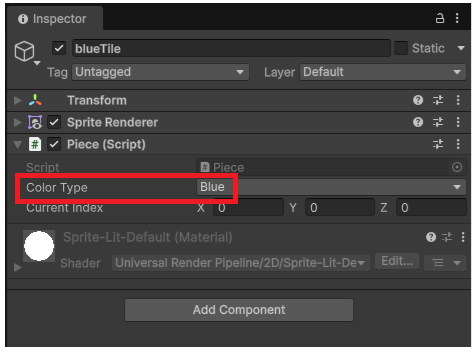
全てのプレハブにアタッチして、色に合わせて変更しておきます。
クリック位置、マウスを離した位置を取得
「Board」スクリプトに下記を追加します。マウスをクリックした位置、マウスを離した位置を取得しています。
    private void Update()
    {
        if (Mouse.current.leftButton.wasPressedThisFrame)
        {
            Vector2 mousePos = cam.ScreenToWorldPoint(Mouse.current.position.ReadValue());
            Debug.Log("Press:" + Vector2Int.RoundToInt(mousePos));
        }

        if (Mouse.current.leftButton.wasReleasedThisFrame)
        {
            Vector2 mousePos = cam.ScreenToWorldPoint(Mouse.current.position.ReadValue());
            Debug.Log("Release:" + Vector2Int.RoundToInt(mousePos));
        }
    }
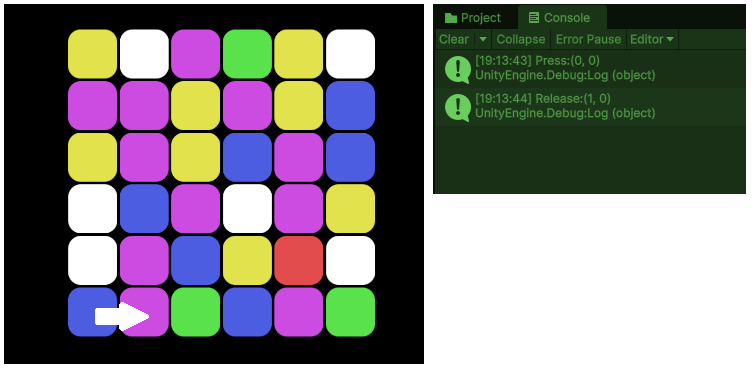
試しに実行します。一番左下のピースを選択して、横にマウスを動かした後に離します(スライド)。コンソールに座標が正しく表示されていたらOKです。
「Board」プレハブを変更します。「GameObject」→「Piece」に変更。Dictionaryを追加します。変更箇所のみ記載してあります。
using System.Collections.Generic;
using UnityEngine;
using UnityEngine.InputSystem;

public class Board : MonoBehaviour
{
    [SerializeField] private Piece[] piecePrefabs;

    public Dictionary<Vector3Int, Piece> dic = new();

    void GenerateBoard()
    {
        for (int y = 0; y < height; y++)
        {
            for (int x = 0; x < width; x++)
            {
                Vector3Int pos = new Vector3Int(x, y, 0);

                int randomIndex = Random.Range(0, piecePrefabs.Length);
                Piece piece = Instantiate(piecePrefabs[randomIndex], pos, Quaternion.identity);
                dic.Add(pos, piece);
            }
        }
    }
}
Dictionaryはキーと値がセットになっています。今回は座標位置をキーとして、ピースを格納しています。
ピースの入れ替え
「Board」スクリプトを下記に変更します。全てを記載してあります。追加したのは「Update内のPieceSlide」です。ピースの位置を変更、Dictionaryの値の入れ替えを行っています。
using System.Collections.Generic;
using UnityEngine;
using UnityEngine.InputSystem;

public class Board : MonoBehaviour
{
    [SerializeField] private int width = 6;
    [SerializeField] private int height = 6;
    [SerializeField] private Piece[] piecePrefabs;

    private Camera cam;

    private Dictionary<Vector3Int, Piece> dic = new();

    private Piece workPiece;
    private Vector3Int StartPos, EndPos;
    private bool isSlide;

    private void Start()
    {
        isSlide = false;
        cam = Camera.main;
        SetCameraPos();
        GenerateBoard();
    }

    private void Update()
    {

        if (Mouse.current.leftButton.wasPressedThisFrame)
        {
            Vector2Int mouPos = Vector2Int.RoundToInt
                (cam.ScreenToWorldPoint(Mouse.current.position.ReadValue()));
            StartPos = new Vector3Int(mouPos.x, mouPos.y, 0);
        }
        if (Mouse.current.leftButton.wasReleasedThisFrame)
        {
            Vector2Int mouPos = Vector2Int.RoundToInt
                (cam.ScreenToWorldPoint(Mouse.current.position.ReadValue()));
            EndPos = new Vector3Int(mouPos.x, mouPos.y, 0);
            isSlide = true;
        }
        if (isSlide)
        {
            PieceSlide();
        }
    }

    private void SetCameraPos()
    {
        float x = (float)(width - 1) / 2;
        float y = (float)(height - 1) / 2;

        cam.transform.position = new Vector3(x, y, cam.transform.position.z);

    }
    private void GenerateBoard()
    {
        for (int y = 0; y < height; y++)
        {
            for (int x = 0; x < width; x++)
            {
                Vector3Int pos = new Vector3Int(x, y, 0);

                int randomIndex = Random.Range(0, piecePrefabs.Length);
                Piece piece = Instantiate(piecePrefabs[randomIndex], pos, Quaternion.identity);
                dic.Add(pos, piece);
            }
        }
    }
    private void PieceSlide()
    {
        workPiece = dic[StartPos];

        dic[StartPos].MoveToPos(EndPos);
        dic[StartPos] = dic[EndPos];

        dic[EndPos].MoveToPos(StartPos);
        dic[EndPos] = workPiece;

        workPiece = null;
        isSlide = false;
    }
}
試しに実行してみます。ピースをスライドしたときに入れ替わればOKです。
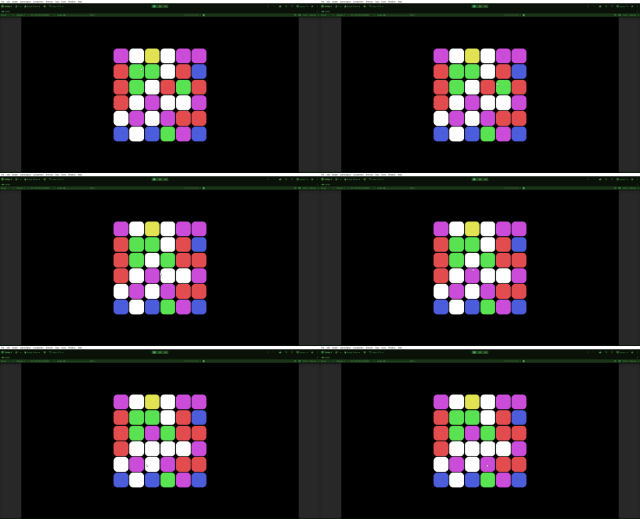
現時点では「隣り合う、ボード内」などの条件が無いため、あくまでも動作確認の段階です。